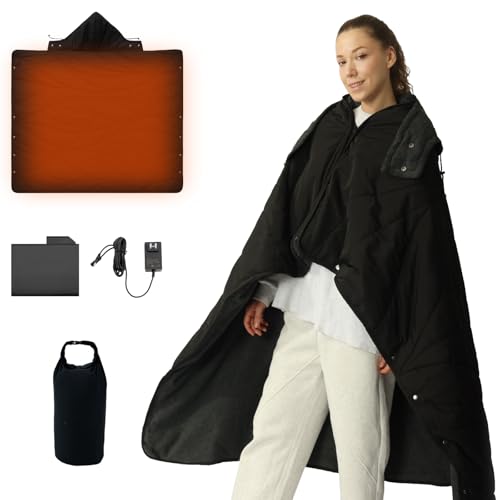
Many users face challenges with heated blankets, including slow heating times, limited mobility, and safety concerns. The ZonLi heated blanket addresses these issues with thoughtful design and practical features.
ZonLi Heated Blanket Overview and Features
The ZonLi heated blanket offers multiple heat settings and a soft fabric designed for comfort. It uses an Intertek-certified controller for safety, which includes auto shut-off after a set period to prevent overheating. The blanket’s wiring is integrated to avoid tangling or damage during washing.

The ZonLi heated blanket uses soft flannel and sherpa materials that feel cozy on the skin. It heats up fast thanks to integrated 2.2 mm heating wires and offers ten adjustable temperature levels from 86 to 122 degrees Fahrenheit. Unlike traditional heated blankets that may take longer to warm, the ZonLi delivers near-instant heat, ideal for quick relief on cold days.
Safety is a priority with this blanket. It features an eight-hour auto shut-off to prevent overheating during extended use. The overheat protection sensor will cut power if temperatures rise dangerously. The blanket is machine washable after detaching the controller, maintaining hygiene without damage.
The 2-in-1 design allows the ZonLi blanket to be used as a traditional throw or a wearable shawl. This versatility supports mobility and convenience, unlike rigid blankets that limit movement. The lightweight construction and soft texture also make it suitable for people sensitive to bulky bedding.
If the blanket stops heating or shows issues, users can try troubleshooting steps such as checking the controller connection and ensuring the power source is active. For persistent problems, contact the manufacturer or a qualified technician to avoid risks.

Common Issues and Troubleshooting for Heated Blankets
Most problems with a ZonLi or Intertek heated blanket come down to power, connections, or the safety system tripping. Work through the simple checks first; if a step fails, stop there and unplug the blanket.
- Make Sure It Has PowerConfirm the outlet works by plugging in a lamp or phone charger. Many controllers have a small indicator light; if it stays off on every outlet, the controller or internal wiring is likely failed and the blanket needs service or replacement.
- Check the Controller ConnectionUnplug the blanket, then firmly reseat the controller plug where it clips into the blanket. A loose or crooked plug is a common reason an Intertek heated blanket will not turn on or heats only on part of the surface.
- Inspect the Cord SafelyLay the cord and controller flat and look for cuts, fraying, scorch marks, crushed spots, or a loose strain relief. If you see any damage at all, do not use the blanket again—damaged cords can overheat or short.
- Reset the Safety SystemIf your blanket shut off or will not heat, unplug it from the wall for 10–15 minutes. This lets internal temperature and tip sensors reset. Plug back in, set the lowest heat level first, and see if it warms evenly.
- Test Settings and LightsStep through each heat level and timer setting. A controller that flashes, shows an error code, or turns off immediately on every setting usually has a sensor fault inside the blanket that you cannot fix at home.
What Flashing Lights and Error Codes Usually Mean
On many heated blankets, a flashing display, a blinking red light, or codes like F1 or E2 mean the controller cannot read the temperature sensor or sees a fault in the wiring. The blanket shuts off on purpose to prevent overheating.
- If the light or code appears only when the cord is bumped, the connector may be loose or worn.
- If the controller shows the code as soon as you power on, the internal sensor circuit is likely damaged.
- If only one side of a large blanket heats and the controller flashes or clicks, one heating zone may have failed.
You can try unplugging the blanket for 10–15 minutes and firmly reconnecting the plug block to clear a temporary fault. If the same error or flashing red light returns, stop using the blanket; continued resets will not fix a broken sensor or broken element.
Replacement Cords and Controllers: What You Can and Can’t Do
Many people look for a “replacement cord for heated blanket” or a new controller by brand name, but most cords are not universal. Each maker wires the plug and sensors for its own models, so mixing parts from another brand or size can defeat the safety features.
- Use only a cord or controller listed by the same manufacturer and rated for the same blanket family and size.
- If your Intertek or ZonLi cord is damaged or missing, contact the blanket brand or retailer for an exact-match replacement.
- Do not try to repair a cut or crushed cord with tape, wire nuts, or a new plug end; the heat these cords carry can turn a bad repair into a fire hazard.
- If you cannot get a listed replacement cord or controller, retire the blanket and replace it with a new one.
Special Notes for Battery and Wearable Heated Blankets
Cordless and wearable heated blankets that run from a battery pack add a few extra failure points. A blanket that will not charge or will not turn on often has a battery, cable, or connector problem, not a fabric or heating-wire problem.
- Confirm the battery charger light comes on and reaches full charge before you blame the blanket.
- Use only the cable and charger supplied or specified by the maker; off-brand fast chargers can trip protection circuits.
- Inspect the USB or barrel connector at the blanket for looseness; repeated bending can crack solder joints and break the circuit.
If a battery-powered or wearable heated blanket shuts off immediately, shows charging lights that flicker, or only runs for a few minutes even after a full charge, the battery pack itself may be at the end of its life. Replacement is usually the only safe fix.
If these steps do not restore normal, even heating, stop using the blanket and contact the manufacturer or retailer for support, a compatible replacement cord, or a warranty claim. Pushing a malfunctioning heated blanket to keep working is exactly how scorched spots, tripped breakers, and fire incidents start.
For more detailed tips on Intertek models, see intertek heated blanket troubleshoot. That guide walks through symptoms like “Intertek heated blanket not working” and what each light pattern or shutoff usually points to.
Understanding Heating Mechanisms in Heated Blankets
Heated blankets like the ZonLi use thin, flexible heating elements woven into the fabric. These elements convert electric power into heat efficiently, spreading warmth evenly across the blanket’s surface.
The red light on a heated blanket usually signals that the blanket is powered on and heating. If the light stays red but the blanket does not warm, it may indicate a fault or a safety cut-off triggered by overheating or a wiring problem.
Intertek heated blankets might not work if the internal safety mechanisms detect a fault. For example, the blanket’s controller may shut power off to prevent hazards if it senses a short circuit or if the temperature exceeds safe limits.
Safety features are critical. Auto shut-off timers turn the blanket off after a set period, usually 2 to 10 hours, to prevent overheating and fire risk. Tip-over protection is not relevant for blankets but overheat sensors are mandatory.
Look for certifications like UL, ETL, or CSA on the blanket or its controller. These confirm it meets strict electrical safety standards and has passed testing for fire and shock hazards.
Comparing Corded and Cordless Heated Blankets
A ZonLi or Intertek heated blanket is usually a corded electric throw that plugs into a 120 V outlet, while cordless models carry a battery pack or use a USB power bank. The trade-off is simple: corded blankets give you stronger, unlimited heat while plugged in; cordless blankets give you a few hours of gentler, portable warmth.
| Feature | Corded Electric Blanket (ZonLi style) | Cordless / Battery Heated Blanket |
|---|---|---|
| Power source while heating | 120 V wall outlet | Rechargeable battery pack or power bank |
| Heat duration | As long as it stays plugged in and turned on (within any built-in timer) | Usually about 2–6 hours per charge, less on the highest setting |
| Heat feel | Often hotter and more even across the blanket | Often milder and focused, to conserve battery |
| Where it works best | Bed, couch, office chair near an outlet | Seats without outlets, bleachers, car trips, camping |
| Mobility | You need to stay within cord length of the outlet | You can move around within the blanket’s size, no cord to drag |
| Maintenance | Unplug controller and cord before washing | Remove battery or power bank; some models are spot-clean only |
With a corded ZonLi heated blanket, heat only flows while the plug is fully seated in the outlet and the controller is on. If the blanket is “not plug in”, it behaves like a regular throw and will cool down within minutes after you turn it off or unplug it.
A cordless heated blanket stores energy in its battery and turns that into low-voltage heat, so once the battery is empty, the heat stops until you recharge. Many people use these for 2–4 hour stretches at games, in cars or during brief outages; for all-evening or overnight use on a bed, a corded blanket is usually more practical.
What “No Plug” And Wearable Heated Blankets Really Are
Any electric heated blanket needs a power source; there is no safe “heated blanket with no plug” that produces heat on its own. If a seller advertises a “no plug heated blanket”, it usually means a battery-powered or USB blanket where the cord disconnects from the fabric, or a regular non-electric throw being described loosely.
Wearable or shawl-style throws, including the 2-in-1 ZonLi design, are shaped so you can snap or wrap them around your shoulders for daily use at a desk or on the sofa. If you want a truly mobile, “daily life wearable heated blanket” you can walk around in or take outside, look at battery-powered ponchos and wraps in our best wearable heated blanket guide or the zonli battery heated blanket overview.
For cordless use beyond a quick outing, you may need spare batteries or power banks and accept that heat on high will drain them faster. To compare cordless options and see how their runtimes really stack up, check our cozy nights cordless heated blanket review.
Cost of Using a ZonLi Heated Blanket
A ZonLi heated blanket uses about 100 watts on its highest setting. To calculate the cost, multiply the power (in kilowatts) by the hours used and the electricity rate. For example, using 100 watts (0.1 kW) for 8 hours at a typical US rate of 17 cents per kWh costs 0.1 × 8 × 0.17 = $0.14 per day.

| Appliance | Power (W) |
|---|---|
| ZonLi Heated Blanket | 100 |
| 1,500 W Space Heater | 1,500 |
Running a ZonLi heated blanket all night is far cheaper than a 1,500-watt space heater running the same time. The blanket uses one-tenth the electricity, so its monthly cost at 8 hours a day is about $4.08 versus $61.20 for the space heater. This makes heated blankets a cost-effective way to stay warm in bed or on the couch.
Electricity rates vary across the US, typically between 12 and 20 cents per kWh. Adjust the calculation with your local rate for an accurate estimate. If you use the blanket fewer hours daily, multiply accordingly to lower the cost.
Compared to central heating or portable space heaters, heated blankets target heat where you need it. This localized warming reduces the need to heat the whole room, saving energy and money. Use a heated blanket as a supplement to your main heating system for the best balance of comfort and cost.
Practical Tips for Maximizing Your Heated Blanket Experience
Choose the size of the ZonLi heated blanket that matches your intended use. A lap or throw size suits reading or watching TV, while a full or queen size covers a bed. The 2-in-1 design lets you wear it as a shawl or use it as a traditional blanket, improving comfort and mobility.
- Check for DamageBefore each use, inspect the blanket and cord for frayed wires, tears, or burns. Do not use if damaged.
- Follow Washing InstructionsUnplug the blanket and detach the controller before washing. Use a gentle cycle with mild detergent and air dry to protect heating elements.
- Store ProperlyFold the blanket loosely without sharp creases to avoid damaging wires. Store in a dry place away from heavy objects.
- Use Safety FeaturesActivate auto shut-off and avoid leaving the blanket on unattended for long periods unless the manual states it is safe.
Regular maintenance and safety checks help your heated blanket last longer and keep you safe. Replace damaged cords rather than trying to repair them. Following the manufacturer’s care instructions preserves the fabric and heating elements.
Frequently Asked Questions
What are the safety features of the ZonLi heated blanket?
How do I troubleshoot my heated blanket if it stops working?
What does the auto shut-off feature do?
How long does a charged ZonLi heated blanket last?
Can I wash my ZonLi heated blanket?
What should I do if my heated blanket is overheating?
We cover understanding zireot blanket in its own guide.
For the detail, see our notes on heated blanket options.