
Thermal cameras are essential tools for HVAC professionals, enabling quick identification of issues like drafts, heat loss, and electrical faults. With various models on the market, choosing the right one can significantly impact the efficiency of inspections.
Comparison of Top Thermal Cameras for HVAC
| Product | Best for | Resolution | Temperature Range | Battery Life | Price |
|---|---|---|---|---|---|
| TOPDON TC004 Mini Thermal Imaging Camera 240×240 | Best Overall | 240 x 240 TISR | -4°F to 842°F | 15 hours | Check price |
| FOXWELL RT280 Thermal Imaging Camera 320×240 LCD | Best for Analysis | 320 x 240 LCD | -4°F to 1022°F | — | Check price |
| Flagfront Thermal Camera 240×240 TISR for Home Inspection | Best Budget | 240 x 240 TISR | -4°F to 1022°F | — | Check price |
| HSFTOOLS HP96 Thermal Imaging Camera 3.5″ Touchscreen | Best for Smart Detection | 96 x 96 base, enhanced to 240 x 240 | — | — | Check price |
| FLIR One Pro Thermal Camera for iOS USB-C Phones | Best Smartphone Accessory | 480 x 360 super resolution (160 x 120 native) | — | — | Check price |


Top Thermal Cameras for HVAC Professionals
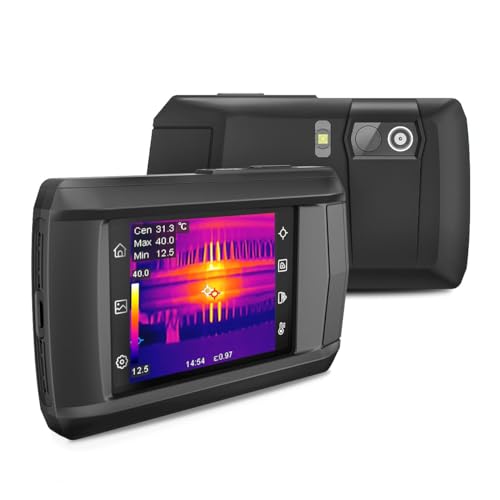
TOPDON TC004 Mini Thermal Imaging Camera 240×240
- Resolution240 x 240 TISR
- Temperature Range-4°F to 842°F (-20°C to 450°C)
- Battery Life15 hours
- Field of View40° x 30°
- Refresh Rate25 Hz
- Enhanced 240×240 TISR resolution for clear thermal details
- Smart temperature alerts and automatic pinpointing of critical spots
- Long 15-hour battery life with adjustable auto shut-off intervals
- Mini, lightweight design for easy portability and comfortable use
- No built-in storage capacity for images
- Electronic manual only, no printed version
FOXWELL RT280 Thermal Imaging Camera 320×240 LCD
- Resolution320 x 240 LCD
- Temperature Range-4°F to 1022°F
- Battery Life—
- Field of View—
- Drop Resistance6.6 feet
- Large 2.8″ 320×240 LCD screen with smooth image display
- Built-in 8GB memory for extensive image and video storage
- PC software for detailed 2D/3D thermal analysis
- Rugged design with IP54 dust/water resistance and drop protection
- Laser pointer and LED light for accurate targeting
- PC software only compatible with Windows, not Mac
- Heavier and bulkier than compact models
Flagfront Thermal Camera 240×240 TISR for Home Inspection
- Resolution240 x 240 TISR
- Temperature Range-4°F to 1022°F
- Battery Life—
- Field of View50°
- Drop Resistance6.6 feet
- 240×240 super resolution with 25Hz refresh rate
- Temperature alarm for abnormal heat detection
- Durable IP54 dust/water resistant and drop-proof design
- Wide 50° field of view and multiple color palettes
- Temperature range maxes at 1022°F, no battery life stated
- No built-in storage or PC analysis software
HSFTOOLS HP96 Thermal Imaging Camera 3.5″ Touchscreen
- Resolution96 x 96 base, enhanced to 240 x 240
- Temperature Accuracy±2%
- Field of View50°
- Screen Size3.5 inches
- Imaging Modes5 modes including fusion and PIP
- AI-powered IntellFault for automatic scene recognition
- Multiple imaging modes including fusion and PIP
- Live super resolution enhances image clarity during use
- Accurate temperature measurement with ±2% discrepancy
- Lower base resolution sensor at 96×96 before enhancement
- Battery life not specified
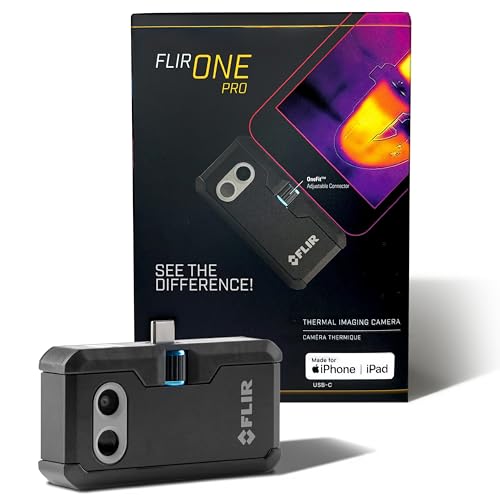
FLIR One Pro Thermal Camera for iOS USB-C Phones
- Resolution480 x 360 super resolution (160 x 120 native)
- Temperature Accuracy±3°C or ±5%
- CompatibilityiPhone 15 and newer with USB-C
- Drop Resistance1.5 meters
- 480×360 super resolution from native 160×120 IR sensor
- MSX image fusion technology for clearer thermal detail
- Step-by-step inspection guides in the app
- Rugged design rated for 1.5 meter drops
- Limited to compatible iOS devices with USB-C port
- Narrower temperature accuracy range compared to standalone units
How to Choose the Best Thermal Camera for HVAC
A thermal camera to find drafts must capture clear images of temperature differences. Resolution matters most: a higher resolution sensor shows more detail, making it easier to spot small leaks or insulation gaps. Models like the TOPDON TC004 offer good resolution around 160×120 pixels, enough for most HVAC tasks.
Temperature range is another key feature. HVAC pros need a camera that detects both cold drafts and hot spots. A range from about -4°F to 752°F (-20°C to 400°C) covers typical HVAC inspection needs. Cameras with narrower ranges limit what you can see, especially in extreme conditions.
Battery life affects how long you can work without interruption. HVAC jobs often require moving through multiple rooms or buildings, so a camera with at least 4 hours of continuous use is ideal. Some models recharge via USB, which adds convenience on the job.
| Feature | Recommended Spec | Why It Matters |
|---|---|---|
| Resolution | At least 160×120 pixels | Shows clear images for detecting small leaks and temperature differences |
| Temperature Range | -4°F to 752°F (-20°C to 400°C) | Covers typical HVAC environments including hot and cold areas |
| Battery Life | 4+ hours | Allows extended use without frequent recharging |
The best thermal camera for HVAC balances resolution, temperature range, and battery life without adding bulk or complexity. The TOPDON TC004 Mini Thermal Imaging Camera fits this balance well. It is designed for pros who need accurate diagnostics quickly, with enough battery life and image quality to handle draft detection and other HVAC tasks.
Understanding Thermal Imaging for Draft Detection
Thermal drafts occur when cold or warm air leaks through gaps in walls, windows, or doors. Infrared technology in thermal cameras detects these drafts by showing temperature differences on surfaces. This lets you see invisible leaks as cooler or warmer areas.
Emissivity settings on a thermal camera adjust how it reads different materials. Surfaces like metal, glass, or painted walls reflect infrared differently. Setting emissivity correctly improves temperature accuracy and helps avoid false readings when looking for drafts.
Color palettes translate temperature data into visible colors. Common palettes use blue for cold areas and red or yellow for warm spots. Using these palettes helps HVAC pros quickly identify where heat is escaping or cold air is entering, even in complex environments.
- Set emissivity for the surfaceCheck the manual for recommended emissivity values or use a standard setting around 0.95 for most building materials.
- Scan suspected draft areasMove slowly along windows, doors, and wall edges to detect temperature differences.
- Use color palettesSwitch between palettes like ironbow or rainbow to highlight temperature contrasts clearly.
Safety and Certification for Thermal Cameras
Thermal cameras for HVAC work must have proper safety features and certifications to ensure reliable and safe operation. Look for an IP (Ingress Protection) rating that shows the camera’s resistance to dust and water. An IP54 or higher rating means the camera can handle dusty environments and light splashes, common conditions on job sites.
Electrical and thermal safety certifications protect users and their equipment. Cameras with UL, ETL, or CSA certification meet recognized safety standards for electrical devices. This reduces risks like electric shock or overheating during extended use.
Ergonomic design also matters since HVAC pros often inspect multiple areas per job. Cameras with lightweight bodies, comfortable grips, and intuitive controls reduce hand fatigue and speed up inspections. A well-balanced camera with a clear display helps users focus on identifying issues rather than adjusting the device.
Common Misconceptions About Thermal Cameras
Thermal cameras support but do not replace traditional HVAC tools. They reveal temperature differences but do not measure airflow, pressure, or other system parameters. Use them alongside standard gauges and meters for a complete diagnosis.
Not all thermal cameras detect moisture. Some models include moisture meters or software features for this, but most only show surface temperature. Always check the specifications if moisture detection is important for your inspections.
Higher price does not guarantee better performance for HVAC tasks. Some expensive cameras offer features aimed at industrial or electrical inspections that HVAC pros rarely need. Choosing a model with the right resolution, temperature range, and user interface is more important than paying for extras.
Frequently Asked Questions
What is the best thermal camera for finding drafts?
How do I use a thermal camera for HVAC inspections?
What features should I look for in a thermal camera?
How accurate are thermal cameras for measuring temperature?
Can thermal cameras detect moisture issues?
What is the typical battery life of thermal cameras?
We go through portable heater issues step by step in a separate article.
Readers in this position usually ask about best hvac torch kit as well. It helps to understand safety solutions for hvac before spending anything.